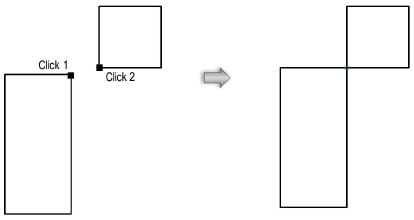
Constrain two selected points to remain attached. If one object is moved, the object it is constrained to adjusts to maintain the connection. The first point stretches to connect to the second point, if necessary.
To constrain the connection between two points:
1. Click the Constrain Coincident tool from the Dims/Notes tool set.
2. Click on the point to constrain.
The cursor switches to the bull’s-eye cursor.
3. Click on the point to be constrained.
A green coincident constraint is drawn where the two points touch.