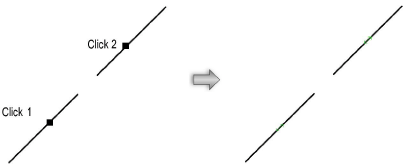
Constrain the collinearity between two linear objects. If one line is moved, the line it is constrained to adjusts to remain aligned. Lines do not need to be aligned when placing the constraints; the first line moves to become collinear to the second line.
To constrain the collinearity between two lines:
1. Click the Constrain Collinear tool from the Dims/Notes tool set.
2. Click on the line to constrain.
The cursor switches to the bull’s-eye cursor.
3. Click on the line to be constrained.
Green collinear constraint indicators are drawn on the two lines.