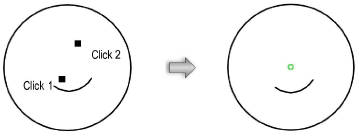
Constrain circles and arcs concentrically. If a circle or arc is moved, the circle or arc it is constrained to moves so that their centers remain aligned. Circles and arcs do not need to be concentric when placing the constraints; the first object moves so that its center aligns to the second object’s center.
To constrain two circles or arcs concentrically:
1. Click the Constrain Concentric tool from the Dims/Notes tool set.
2. Click on the object to constrain.
The cursor switches to the bull’s-eye cursor.
3. Click on the object to be constrained.
A green concentric constraint is drawn at the center of the two objects.