Constrain the distance of an edge of an object, line segment, or between two points regardless of the angle. If an object is accidentally resized, the constraint prevents the operation, preserving the original distance. When the constraint is on two different objects, if one object is modified, the object to which it is constrained moves to remain at the same constrained distance.
To constrain the distance of an edge of an object or line segment:
1. Click the Constrain Distance tool from the Dims/Notes tool set.
2. Click on the object to be constrained.
A green horizontal distance constraint is drawn on the object.


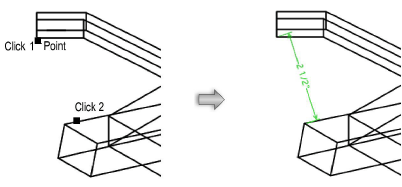
To constrain the distance between two points:
1. Click the Constrain Distance tool from the Dims/Notes tool set.
2. Click on the first point to be constrained.
The cursor switches to the bull’s-eye cursor.
3. Click on the second point to be constrained.
A green distance constraint is drawn between the two points.