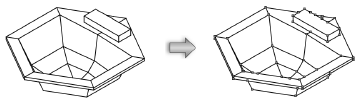
The Convert to Lines command changes a single object into the series of lines needed to create it. For example, a rectangle is converted into four lines.
Circles and ovals can also be converted into numerous line segments. However, especially when converting circles, the accuracy of the line segments depends on the 2D conversion resolution setting chosen in the Vectorworks Preferences dialog box.
To convert an object to lines:
1. Select the object to convert.
2. Select Modify > Convert > Convert to Lines.
3. If the object can be rendered, select the wireframe, hidden line, or dashed hidden line rendering conversion option.
4. Click OK.
The object is converted into lines and each segment can be manipulated.