 Hardscape tag appearanceHardscape tag appearance
Hardscape tags can be adjusted in several ways.
● When hardscape tags are required, their default appearance is normally specified in the hardscape object settings.
● Individual hardscape tags can then be changed for selected hardscape objects by adjusting the hardscape tag parameters from the Object Info palette.
● The hardscape tag class controls the appearance of the leader/shoulder lines, as well as the marker style.
● To align hardscape tags for improved readability, use the Align/Distribute Leader Lines command (see Aligning and distributing leader lines).
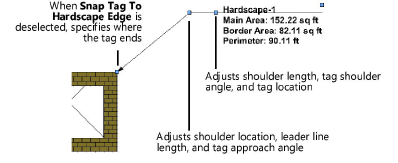
● If an individual tag needs to be repositioned, hardscape tags also have two control points for adjusting the shoulder length, tag shoulder angle, and tag location; or the shoulder location, leader line length, and tag approach angle.
~~~~~~~~~~~~~~~~~~~~~~~~~