Tips for prompting the AI Visualizer
Use clear and precise natural language, and include specific details for the best results. While the text prompt on the Generate tab should include a description of the image, the prompt on the Edit tab should be phrased as instructions, telling the AI model what actions to take.
The prompts can be long and detailed and include full paragraphs of information, including multiple changes to complete at once when editing the image. It may work best if you start with a simple prompt, test it to get an understanding of how the AI interprets the prompt, and then build a longer and more complex prompt from there. Once you understand what kinds of results the current prompt generates, add more details or change some of the existing text to steer AI in the direction needed. You may find that AI large language models are useful for developing prompts. In addition to the tips below, visit the AI Visualizer topic on the Vectorworks Forum for a dynamic discussion of this evolving technology.
While the tips below are not exhaustive, and you will develop your own favorite approaches, there are certain types of prompts that lead to good results:
Deliverable and subject
What are we looking at?
When basing the image on a reference model or rendering you provide: "Keep the building design, proportions, openings, structure, and camera unchanged. Do not modify the massing. Do not add or remove any architectural elements."
"A wide-angle exterior photograph of a single-story minimalist villa"
"A straight-on elevation watercolor of an Edwardian building facade"
Style of the objects in the image: "modern," "Mayan," "brutalist," "art deco," or even the name of a well-known designer whose style you want to explore
Camera and composition
Describe the exact viewpoint, framing and lens. Nano Banana models respond well to explicit camera language, which you can adapt to the context of the view you want to provide.
For site context: "aerial drone photograph" or 45-degree elevated axonometric view with parallel projection"
For facades: "straight-on elevation photograph" or "low angle view, looking up"
For interiors: "wide-angle from corner" or "shot from seated position, editorial interior photography"
You can enter a reference model or drawing and ask the AI Visualizer to provide an alternative view: "Using the attached image as the geometric anchor: Aerial drone photograph from 200 feet high, 45-degree downward angle" or "Using the attached image to define the exterior glass and structure: Interior architectural photograph of the ground floor main lobby, looking outward through the facade"
For exact camera specifications to be used for photorealistic images, enter one camera phrase and one lens per prompt: "Hasselblad X2D camera with a 90mm lens at f/2.8."
Materials and textures
Generic prompts yield generic buildings. Be highly specific about finishes to ground the rendering in reality.
Instead of "stone," use: "pale precast concrete with fine aggregate," "filled travertine stone", or "board-formed concrete"
Instead of "wood," use "thermally modified ash" or "charred timber."
Instead of "metal," use: "cor-ten steel," "blackened-steel trim," "aged bronze" or "standing-seam zinc"
Lighting and atmosphere
You can use the AI Visualizer to sculpt with light. Because Nano Banana understands real-world physics, you should use directional language and specific prompts to define the mood with the time of day and season.
"Soft key light from upper left at 45 degrees, subtle rim light from behind right"
"Blue hour, deep blue sky just after sunset, every window glowing warm from inside"
"Early morning sun at a low angle, raking across the scene, creating precise shadow lines"
"A bright spring afternoon with dappled light coming through new leaves"
"The camera faces southeast at mid-morning" (to place the sun and shadows correctly)
Context and action
What is happening around the space?
Where is the model set? "An office tower set on the corner of two busy urban boulevards" or "a park along a riverside"
Are there people? If so, who are they and how are they dressed? What are they doing? "A dozen men and women from different ages and racial and ethnic groups, wearing business casual clothing and talking in small groups" or "Baristas behind the counter wearing black aprons, and customers standing in line to order. Some customers are dressed casually and some are in business attire."
What style of furniture, plants, and other things populate the scene? Palm trees, Mission style dining room table, a vase of pink peonies
Text and labels
Text rendering is one of Nano Banana 2's clear strengths, making it perfect for architectural diagrams, floor plans, and timeline infographics, as well as for adding signage to objects in the image. If you want labels or text baked into the image, provide the model with four things in one sentence: the exact words, in quotation marks; the font style; the size hierarchy; and placement.
Output resolution:
Provide the output resolution, if a specific one is needed; this helps the model plan the composition correctly before rendering.
Examples
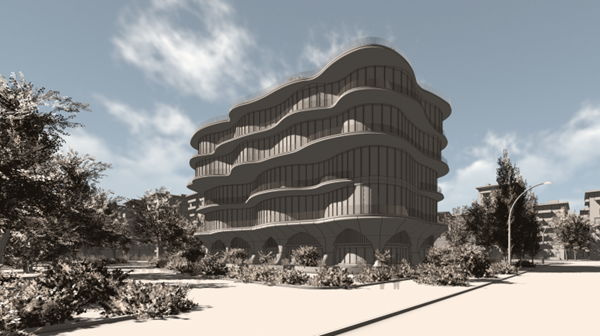
Original image
Prompt
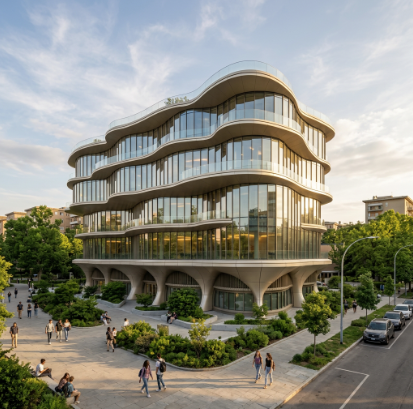
Render this Vectorworks model view as a photorealistic architectural image of a mixed-use building. Realistic materials and light, like professional architectural photography. Keep the geometry, proportions, and camera angle exactly as shown; do not add, remove, or move any windows, doors, or railings. Materials: glass curtain wall and metal panel. Setting: campus. Lighting: warm golden-hour sun with long shadows. Season: summer, full green foliage. Add a few people and parked cars.
Result
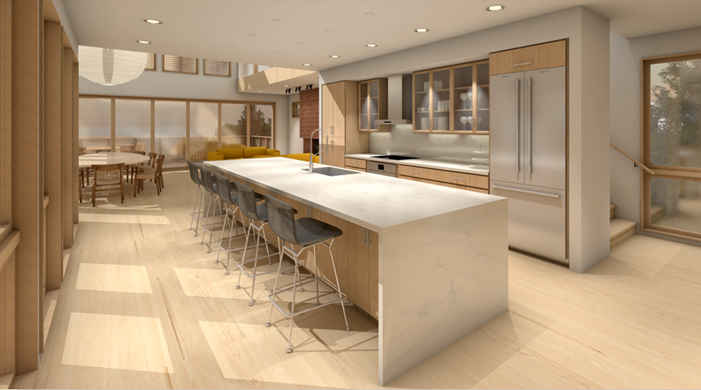
Original image 2
Prompt 2
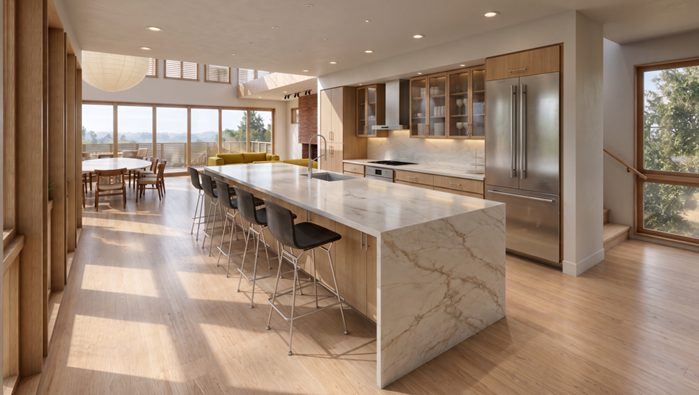
Enhance this interior rendering with soft ambient lighting, warm neutral tones, and realistic material textures while preserving the original layout.
Result 2