Inserting a
Photometer Inserting a
Photometer
Inserting a
Photometer Inserting a
Photometer 
To insert a photometer:
1. Ensure that each lighting instrument contributing to the illumination is focused.
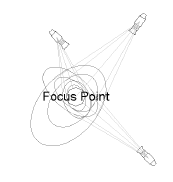
The light beams do not have to be drawn for calculations to be made.
2. Click the Photometer tool from the Spotlight tool set.
3. Click to place the photometer in the drawing, and click again to set the object’s rotation. If this is the first time the object is placed in the drawing, an object properties dialog box opens. These parameters apply to subsequently created objects; they can be changed later by accessing them from the Object Info palette.
4. Specify the object properties and click OK.
Click to show/hide the parameters.
After placing the photometer, set the its Z value on the Object Info palette; illumination values vary depending on the photometer’s elevation.
~~~~~~~~~~~~~~~~~~~~~~~~~