Click
to show/hide the parameters.
Click
to show/hide the parameters.After creation, edit section lines and section-elevation markers as follows:
● Use the Object Info palette to edit the graphic properties (such as the marker style).
● Use the Attributes palette to apply attributes (such as the fill or pen color).
● Use options on the Text menu to control the text appearance (such as the font or size), or assign a text style.
● Use the Selection or Reshape tool to edit the objects (see Modifying Section Lines Graphically).
● A section-elevation marker can be linked to a viewport by selecting the viewport from the Link To Viewport list on the Object Info palette (Design Series only).
Parameters display on the Object Info palette for selected section-elevation markers.
 Click
to show/hide the parameters.
Click
to show/hide the parameters.
Parameter |
Description |
Rotation |
Sets the marker rotation; if the marker was created from a rotated plan view, this parameter can be used to reset the marker to the world coordinate system |
Text Style |
Select a text style from a library or the current file. To use the style defined for the object’s class, select <Class Text Style>. To format the text using options on the Text menu, select <Un-Styled>. See Using Text Styles and Formatting Text. |
Configuration |
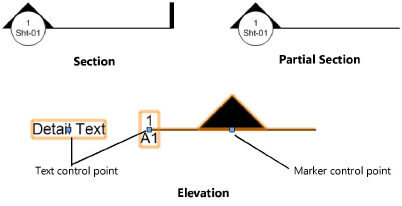
Select the marker configuration ● Section: draws a section marker at both ends of a straight or broken section line ● Partial Section: draws a section marker at the beginning of a straight or broken section line ● Elevation: draws a section marker along a straight section line at a control point, which can be dragged to a new location
|
Flip |
Reverses the direction of the marker |
Create Section Viewport (Design Series only) |
For section-elevation markers that are not already linked to a viewport, click to open the Create Section Viewport dialog box and create a vertical section viewport (see Creating a Vertical Section Viewport); the section-elevation marker is converted to a section line when the viewport is created. Section-elevation markers with angles other than 90° (or straight lines) cannot be used to create section viewports. |
Navigate to Viewport (Design Series only) |
Navigates to the viewport linked to the section-elevation marker |
Opens the Set Marker Style dialog box, to select the section marker type at each end of the section line; markers can be the same (Match Beginning) or different (Differentiate) at each end of the section line. Select from a library or the current file. |
|
Link To Viewport (Design Series only)
|
Links the section-elevation marker to an existing viewport; select the viewport to link to from the list. A green link icon (next to the beginning marker in the drawing) indicates that the section-elevation marker is linked to a viewport. When a section-elevation marker is linked to a standard viewport, the sheet number is synced; when it is linked to a section viewport, both the drawing number and sheet number are synced. |
Marker Size |
Specifies the size of the section marker, measured from the marker’s insertion point to the top of its longest point. Changes to the marker size do not affect the text size. |
Use Gapped Line (Section and Partial Section configurations only) |
Displays the section line with a gapped line
|
Gap Line Length |
If Use Gapped Line is selected, specifies the length of the solid section line at each end of the section line |
Text Auto-Rotate |
When selected, the marker text always displays in the same orientation; when deselected, the text is rotated according to the Text Rotation value
|
Text Both Ends (Section configuration only) |
Displays text at the end of the marker, as well as the beginning |
Text Config |
Specifies the display style for the Drawing Number and Sheet Number text; if Dwg. No.-Sheet No. or Sheet No.-Dwg. No. is selected, specify a Text Separator to place between the text items |
Text Rotation |
When Text Auto-Rotate is not selected, specifies the rotation of the marker text |
Text Sheet % |
Specifies the scale value for the Sheet Number portion of the marker text. Enter a number larger than 100 to make the text larger. Enter a number below 100 to make it smaller. The scale value must be larger than 1. |
Text Separator |
For the Dwg. No.-Sheet No. and Sheet No.-Dwg. No. text configurations, specifies the separator to place between the Drawing Number and Sheet Number text |
Drawing Number |
Enter the Drawing Number of the referenced section viewport; this value is assigned by default for section-elevation markers that are linked to a section viewport (Design Series required) |
Sheet Number |
Enter the Sheet Number of the referenced section viewport; this value is assigned by default for section-elevation markers that are linked to a viewport (Design Series required) |
Detail Text |
Enter additional text to appear next to the marker; the text has its own control point and can be positioned separately |
 Section Line Properties
Click
to show/hide the parameters.
Parameter |
Description |
Text Style |
Select a text style from a library or the current file. To use the style defined for the object’s class, select <Class Text Style>. To format the text using options on the Text menu, select <Un-Styled>. See Using Text Styles and Formatting Text. |
Section Viewport
|
Displays the name of the viewport associated with the section line; a section line that is not associated with a viewport is labeled “Not Linked.” A red broken link icon (next to the line) indicates the line is not linked to a viewport. |
Create Section Viewport |
For section lines that are not already linked to a viewport, click to open the Create Section Viewport dialog box and create a vertical section viewport (see Creating a Vertical Section Viewport) |
Reverse Direction |
Reverses the side to display when objects beyond the section plane are visible |
Navigate to Section Viewport |
Navigates to the section viewport associated with the section line |
Opens the Set Marker Style dialog box, to select the section marker type at each end of the section line; markers can be the same (Match Beginning) or different (Differentiate) at each end of the section line. Select from a library or the current file. |
|
Configuration |
Select the section line configuration ● Section: draws a section marker at both ends of a straight or broken section line ● Partial Section: draws a section marker at the beginning of a straight or broken section line ● Elevation: draws a section marker along a straight section line at a control point, which can be dragged to a new location
|
Marker Size |
Specifies the size of the section marker, measured from the marker’s insertion point to the top of its longest point. Changes to the marker size do not affect the text size. |
Use Gapped Line (Section and Partial Section configurations only) |
Displays the section line with a gapped line
|
Gap Line Length |
If Use Gapped Line is selected, specifies the length of the solid section line at each end of the section line |
Text Auto-Rotate |
When selected, the marker text always displays in the same orientation; when deselected, the text is rotated according to the Text Rotation value
|
Text Both Ends (Section configuration only) |
Displays text at the end of the marker, as well as the beginning |
Text Config |
Specifies the display style for the Drawing Number and Sheet Number text; if Dwg. No.-Sheet No. or Sheet No.-Dwg. No. is selected, specify a Text Separator to place between the text items |
Text Rotation |
When Text Auto-Rotate is not selected, specifies the rotation of the marker text |
Text Separator |
For the Dwg. No.-Sheet No. and Sheet No.-Dwg. No. text configurations, specifies the separator to place between the Drawing Number and Sheet Number text |
Text Sheet % |
Specifies the scale value for the Sheet Number portion of the marker text. Enter a number larger than 100 to make the text larger. Enter a number below 100 to make it smaller. The scale value must be larger than 1. |
Auto-coordinate |
For section line objects associated with a section viewport, automatically displays the Drawing Number of the referenced section viewport, and the viewport’s Sheet Number. Deselect this option to enter the Drawing Number and Sheet Number manually. |
Drawing Number |
Enter the Drawing Number of the referenced section viewport; this value is assigned by default for section lines when Auto-coordinate is selected, and for section-elevation markers that are linked to a section viewport |
Sheet Number |
Enter the Sheet Number of the referenced section viewport; this value is assigned by default for section lines when Auto-coordinate is selected, and for section-elevation markers that are linked to a viewport |
~~~~~~~~~~~~~~~~~~~~~~~~~
Creating a Vertical Section Viewport