 L wall component joins
|
Mode |
Tool |
Tool set |
Shortcut |
|
L Join
|
Component Join
|
Building Shell |
Alt+Shift+J (Windows) Option+Shift+J (Mac) |


The L Join mode joins the closest ends of two wall components to create a corner. Both component lengths are extended or shortened, as necessary, until they meet cleanly.
To join wall components with the L Join mode:
Click the tool and mode.
Select the component within the wall segment to join.
Select the second wall segment to join. The component to be joined is highlighted.
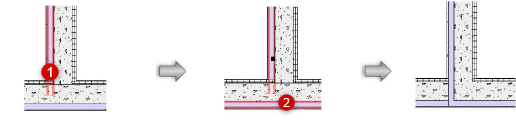
Repeat steps 2 and 3 for each component within the wall segment that needs to be joined.
