Updating schematic views
|
Command |
Workspace: Path |
|
Update All Schematic Views |
Design Suite: Entertainment > Visualization Spotlight: Spotlight > Visualization |
When the model objects shown in a schematic view are changed, the schematic objects may not update automatically. A red and white striped border indicates which objects require updating.
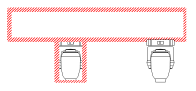
To update schematic views so they sync with the model, do one of the following:
To update all schematic views, select the command. The update may take a few minutes. This updates all schematic views, whether showing as out of date, or not.
To update one or more schematic views, select the schematic views to update, and click Update Geometry from the Object Info palette.
