 Relocating a removed object
An object removed from a phase can be placed in a new location in the active phase, or stored and placed in a future phase.
To relocate a removed object from the drawing area:
Do one of the following to select the object instance to relocate:
In the Phasing palette - Removed Objects, select the instance from the list, and click Place Object for Relocation; skip to step 4.
In the drawing area, select the instance. Depending on the data visualizations used, you may have to select a phase in which the instance is present to see it for selection.
On the View bar, if the active phase isn't already set to to the phase when the object was removed, activate the proper phase. If you are unsure which phase to activate, refer to Phase Removed on the Object Info palette or the Phasing palette - Removed Objects.
The Object Info palette should display a Status in Active Phase of Removed. If the status is Demolished, select Reuse to make the object eligible for relocation.
Click Place Object for Relocation in the Object Info palette, or right-click the object and select Place Object for Relocation in the Object Phasing section of the context menu.
If Navigate to Relocated Instance is available instead of Place Object for Relocation, this instance of the object has already been relocated. You can navigate to the relocated instance to see where it is used, and if you need to relocate that instance, you can do so then.
A bull's eye cursor displays, along with a dotted outline of the object to be placed.
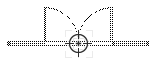
On the View bar, activate the phase when the object should be relocated in the drawing.
Click to place the object in the drawing.
When the object is placed, the following things happen automatically:
Phase Relocated is set to the active phase on the Object Info palette and in the Phasing palette - Removed Objects, and the Phase Removed is set to <None>.
On the Object Info palette, Status in Active Phase changes to Relocated in the phase it was relocated, and Existing in future phases.
On the Phasing palette - Removed Objects, Final Operation displays Relocated.
Relocated instances can be moved and rotated as usual.
